Price Calculation Tool Overview
Use Price Calculation to preview the difference between a cash price and a card price before starting a payment. This tool is informational only — it does not charge anything, save any values, or affect any account.
No payment is processed
Using this tool does not authorize, submit, or post any charge. Nothing is saved when you close the tool.
When to use this
- You need to explain the difference between cash and card pricing to a customer.
- You want to estimate what a customer will pay before opening the full payment screen.
- You need to answer a pricing question without committing to a charge.
Where to find it
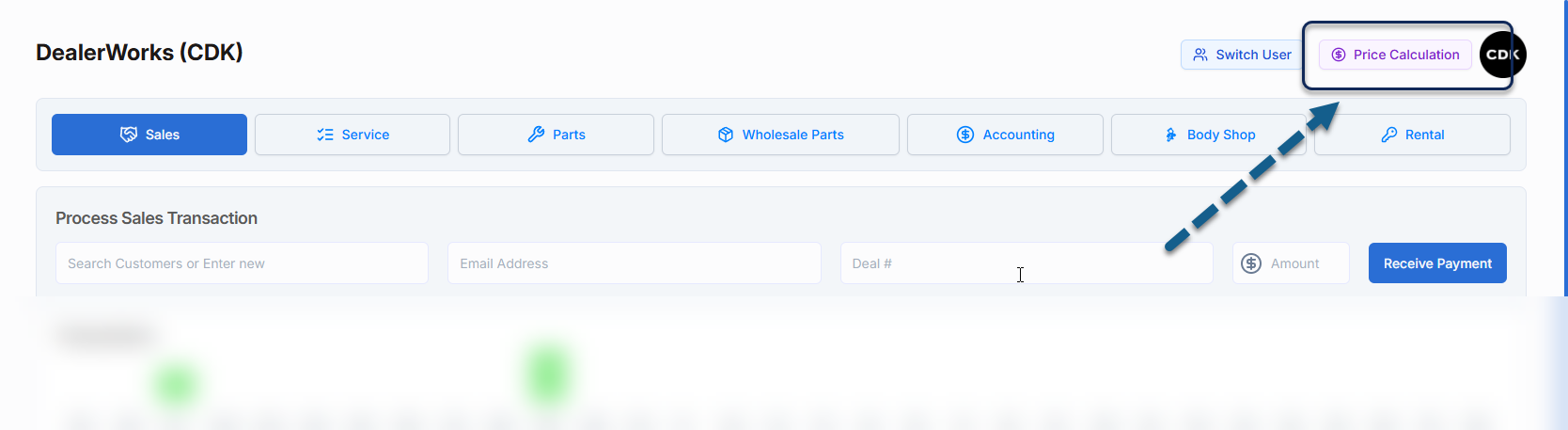
Select Price Calculation from the top-right corner of DealerWorks.
How it works
- 1
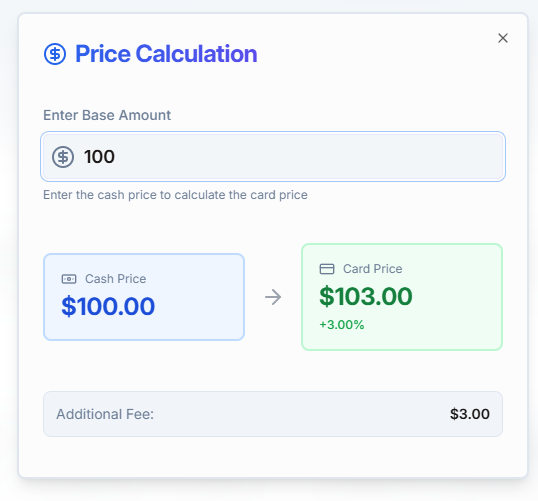
Enter the Base Amount — this is the intended cash price.
- 2
DealerWorks displays the corresponding Card Price, calculated using your dealership's configured pricing settings.
- 3
Values update automatically as you change the amount.
Frequently asked questions
| Question | Answer |
|---|---|
| Does entering an amount charge the customer? | No. The tool does not process or submit any payment. |
| Are the values saved or attached to the RO? | No. The tool clears when you close it. Nothing is attached to any customer or account. |
| Where does the card price come from? | From your dealership's configured pricing settings — typically a percentage or fixed fee applied to the base amount. |
| Is the estimate exact? | The final charged amount is determined when you select a payment method and complete the transaction on the payment screen. |
Related articles
How to process a terminal card payment · Integrated vs Standalone Payments in DealerWorks
Was this article helpful?
That’s Great!
Thank you for your feedback
Sorry! We couldn't be helpful
Thank you for your feedback
Feedback sent
We appreciate your effort and will try to fix the article