If a customer asks what it will cost to pay by card, you can work it out without opening their order at all.
Use the price calculator
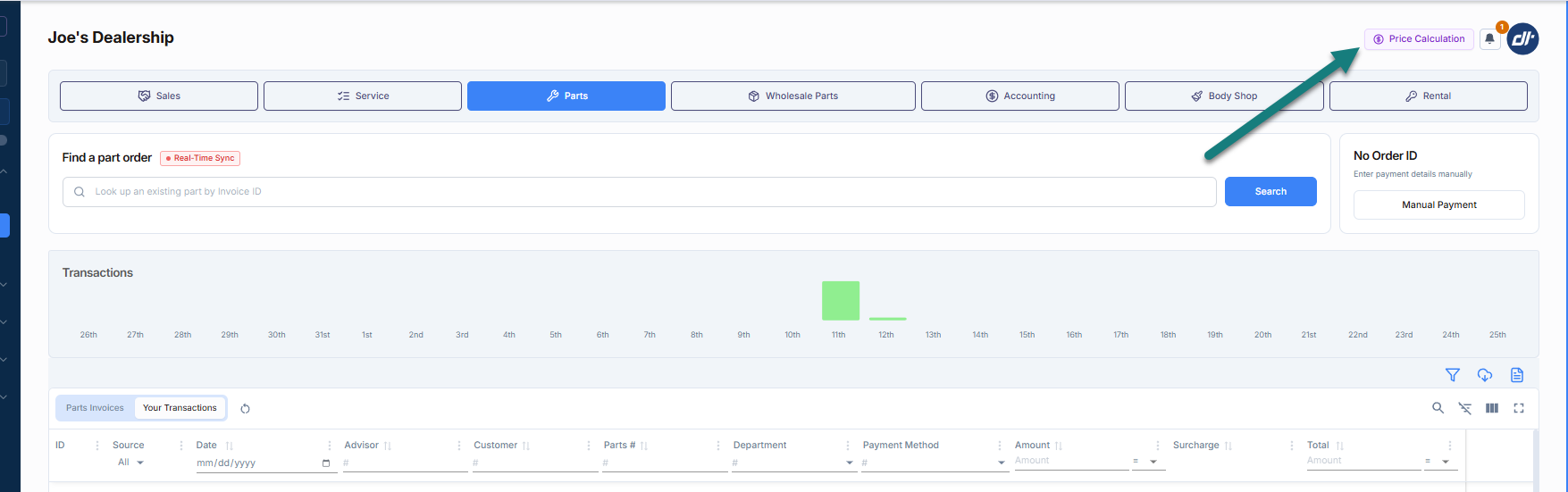
- Click Price Calculation at the top of the screen.
It sits next to the notification bell, top right. - Type the amount into Enter Base Amount.
- Read off what the customer pays.
The cash amount is shown as the base, and underneath it is what the same payment costs on a card.
Say a $100.00 order has a 3% fee — the calculator would show the customer paying $103.00.
Worth knowing
- It reads your dealership’s own pricing.
What it shows is what your customers are actually charged, not a generic figure. - It shows the credit price.
Treat it as the most they would pay — see Was my customer charged the additional fee?. - Nothing is recorded.
It is a quote, not a transaction. No order is opened and nothing is taken.
Related: Taking a payment — start here · Was my customer charged the additional fee? · Take a payment on a terminal · What your customer sees when they open the link
Was this article helpful?
That’s Great!
Thank you for your feedback
Sorry! We couldn't be helpful
Thank you for your feedback
Feedback sent
We appreciate your effort and will try to fix the article